By Alex Morgan | Privacy Researcher | Last updated: May 2026
I've spent 2 years researching email privacy and data broker practices. This guide reflects what actually happens to your email address after you hand it over.
Your email address is worth approximately $0.10 on the open data broker market. That sounds low. But multiply it by the 50 services you've signed up for this year, and you're looking at $5 worth of personal data being traded without your knowledge — per service, per year.
What Happens to Your Email After You Sign Up for a Service
The normal path is boring, which is why it works. You enter an email. The service stores it in its CRM. Marketing tools such as Mailchimp, Klaviyo, HubSpot, Salesforce Marketing Cloud, or customer-data platforms may receive it. Ad platforms may get hashed versions for audience matching. Analytics and support tools may see it. If the company changes owners, exports a list, gets breached, or works with a data broker, your address travels again.
Not every company is malicious. The problem is incentives. Email is a stable identifier. You change devices, IPs, and browsers, but many people keep the same email for ten years. That makes it useful for matching records. "Unsubscribe" stops one sender when the sender honors it. It does not remove your address from every copy, partner export, breach dump, or broker profile that already exists.
The most uncomfortable part is how ordinary the pipeline is. A small ecommerce store may install a popup tool, analytics tag, support chat, review widget, and email platform in the same afternoon. Each vendor can touch pieces of customer data. Even when the store owner is acting normally, your email becomes part of a larger vendor graph.
The 5 Ways Your Email Address Gets Leaked
1. Data breaches. Have I Been Pwned tracks breached websites and pwned accounts; it is a useful reminder that email exposure is not theoretical. Check HIBP's breached websites index if you want to see how often email addresses appear in public leaks.
2. Sold by the service you signed up for. Some privacy policies allow sharing with affiliates, partners, advertisers, or "service providers." That language can be broad.
3. Scraped from public profiles. If your address appears on a portfolio, forum, GitHub profile, resume PDF, or business directory, bots can harvest it.
4. Third-party trackers in marketing emails. Tracking pixels can reveal opens, approximate location, device type, and engagement. Your email becomes part of a behavioral profile.
5. Bought lists from companies you never signed up with. This is why spam sometimes comes from brands you have never heard of. They bought or rented a segment that included you.
The pattern to watch for is context collapse. You gave an email to one service for one purpose, but later it appears in a completely different context: recruiting spam, crypto promotions, local lead-gen calls, or newsletters from a partner brand. Disposable email limits that collapse because each address has a narrow purpose.
How Disposable Email Protects You — Specifically
Disposable email works through isolation. If Service A gets breached, the leaked address is not your real inbox. If a download site sells its list, spam goes to an inbox you already abandoned. If a marketer tries to match your address across sites, the disposable address does not connect to your banking email, work email, or personal identity.
There is also practical deniability. You never gave the service your real address, so you do not need to chase GDPR deletion requests for that inbox. Delete the relationship by letting the temporary inbox expire. For one-time signups, FireTempMail is the lowest-friction option.
Per-service isolation is the real win. If you use one personal email everywhere, every breach enriches the same profile. If you use different addresses for low-stakes services, a breach exposes a dead end. The attacker may still see a username or IP metadata, but they do not automatically get the address tied to your bank, family, work, or password manager.
What Disposable Email CAN'T Protect You From
Disposable email does not protect accounts you need to recover later. If the inbox expires, password reset emails are gone. It does not replace phone verification. It does not make a payment method anonymous. It does not stop a platform from fingerprinting your browser or blocking a disposable domain. And it does not make illegal or abusive behavior safe.
This honesty matters: disposable email is an inbox privacy tool, not a full anonymity system.
It also cannot protect messages after they arrive. If a verification email contains sensitive data, do not send it to a public temporary inbox. Treat temporary inboxes like public waiting rooms: fine for a short code, wrong for private documents, contracts, medical records, or anything that would hurt if another person saw it.
Building a Privacy-First Email Strategy
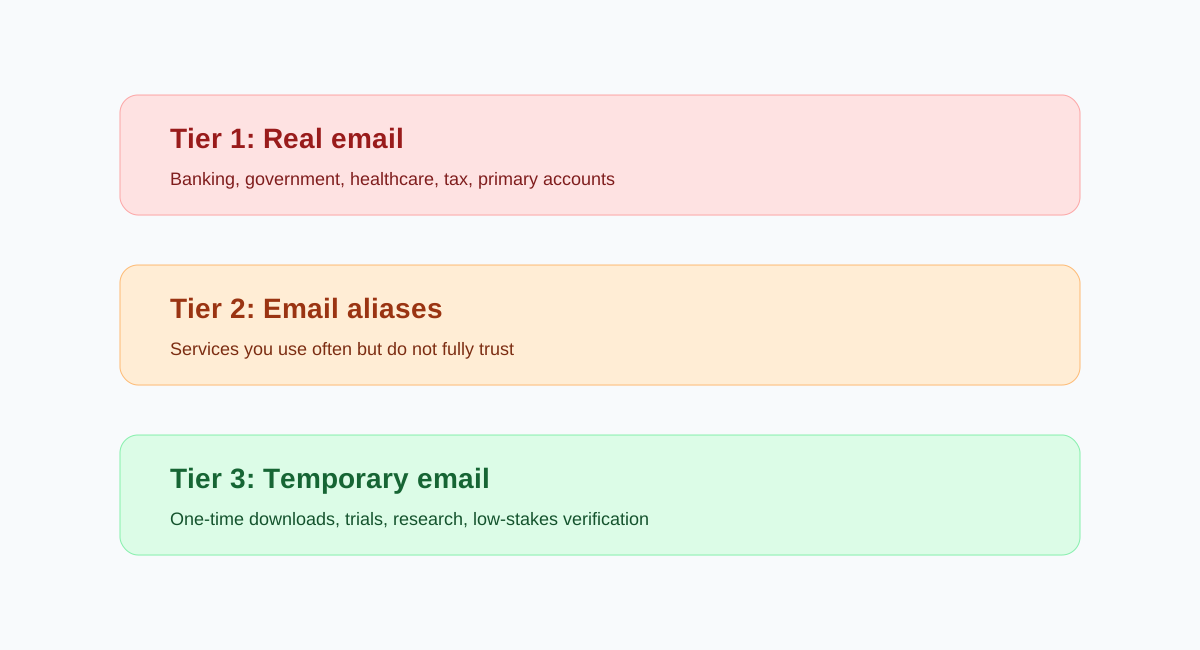
Tier 1: real email. Use this for banking, government, healthcare, tax, school, domains, business tools, and accounts you cannot afford to lose.
Tier 2: aliases. Use SimpleLogin, AnonAddy, or a similar alias for services you use regularly but do not fully trust. Aliases forward to your real inbox but can be disabled one by one.
Tier 3: temp email. Use FireTempMail for one-time downloads, research, trials, and low-stakes verification. Use burner email when you need longer access, and temp Gmail when a platform expects Gmail-style formatting.
Do not overcomplicate the system. Most people only need three rules: real email for accounts with money or identity, alias for accounts you expect to keep, temp email for accounts you expect to abandon. That alone cuts a large amount of spam and reduces the blast radius of future breaches.
Recommended Tools for Email Privacy in 2026
FireTempMail: free, fast, best for one-time inboxes. SimpleLogin / AnonAddy: aliases for repeat services. Proton Mail: private primary mailbox. Tempo-Mail.net: useful when you need persistent temp inboxes or API-driven testing. For a broader comparison, read temp mail vs burner email and the beginner guide.
Tool choice should follow account value. A newsletter popup does not deserve your real email. A health portal does. A shopping site you use monthly probably deserves an alias. A PDF download gate probably deserves a temporary address. Privacy gets easier when you stop treating every signup like it has the same importance.
Review your inbox once a quarter. Search for old accounts, change important ones to aliases, and close accounts you no longer use. Disposable email prevents new exposure, but cleanup reduces old exposure. The combination is stronger than either habit alone.
If a service forces you to use a real email, reduce the rest of the profile. Do not add a phone number unless required. Do not reuse passwords. Disable marketing consent boxes. Privacy is usually won through small defaults repeated many times.
Also separate newsletters from accounts. If you only want content, use a disposable address or alias. If you need account ownership, use an alias you can keep. The privacy mistake is using your primary personal email for both casual reading and permanent identity.
Disposable email is not about hiding from every system on the internet. It is about refusing to make your main inbox the universal key that connects every low-value signup you try.
The strongest privacy habit is consistency. If you use disposable email for random downloads one week and your real email the next, your exposure becomes uneven. Make the low-risk choice the default, then reserve your real inbox for relationships that deserve it.
Start small: use disposable email for the next five low-value signups and see how much less mail reaches your main inbox. The habit becomes obvious once the noise stops arriving.
That is privacy you can feel.
Small defaults compound quickly over time.
Most privacy improvement is not dramatic. It is choosing the less revealing option hundreds of times until your real inbox stops being the address you hand to everyone.
If you want the technical side of platform blocking, see how platforms detect temp email.
FAQ
Is disposable email private?
It protects your real address, but many temp inboxes are not suitable for sensitive content.
Can data brokers still track me?
Yes, through other identifiers. Disposable email only removes one strong identifier.
Should I use temp email for shopping?
For one-time coupons, yes. For order tracking and returns, use an alias or real email.
Does unsubscribe work?
Sometimes. It usually does not remove old exports, breach copies, or partner lists.
How do I start?
Use your real email less. Create aliases for repeat services and temp emails for disposable interactions.